


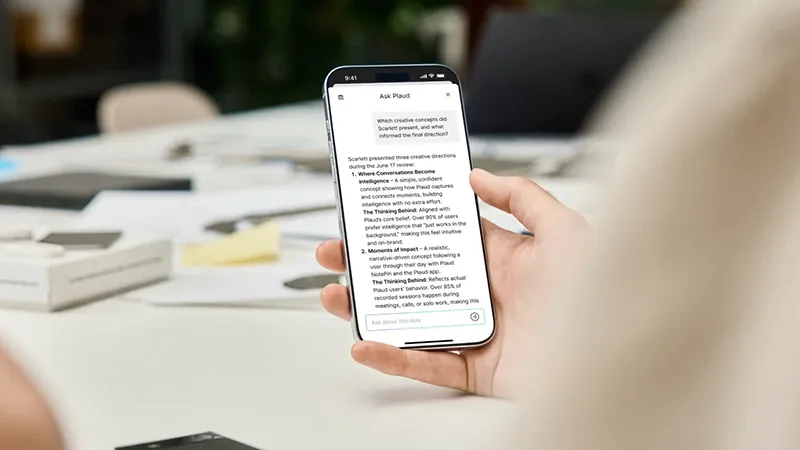
Recording a meeting is easy. But then the recording needs to be transferred, transcribed, summarized, and ideally filed in the right place too. With Plaud AutoFlow, several of those steps can be automated, so your notes can be ready without you having to start each step yourself.
There is something quite satisfying about ending a meeting and knowing the documentation is already on its way to being complete. Especially on days when meetings run back to back and there is barely time to grab a cup of coffee. Plaud has long made it possible to record conversations and turn them into text with the help of AI. With AutoFlow, the workflow becomes even smoother, because you can decide in advance how different recordings should be handled. A client meeting may need a summary with decisions and next steps, while a lecture is better suited to clear study notes.
What does Plaud AutoFlow actually do?
Usually, the work begins after the recording is finished. You open the app, choose the recording, and decide what AI should do with the material. It works well, but when you record a lot of conversations, the same steps can quickly become repetitive.
AutoFlow lets you create automated workflows that start when a recording meets certain conditions. When the recording is synced or uploaded, Plaud can begin transcribing and summarizing it without you having to start the process manually. You can also choose to receive an email when the result is ready.
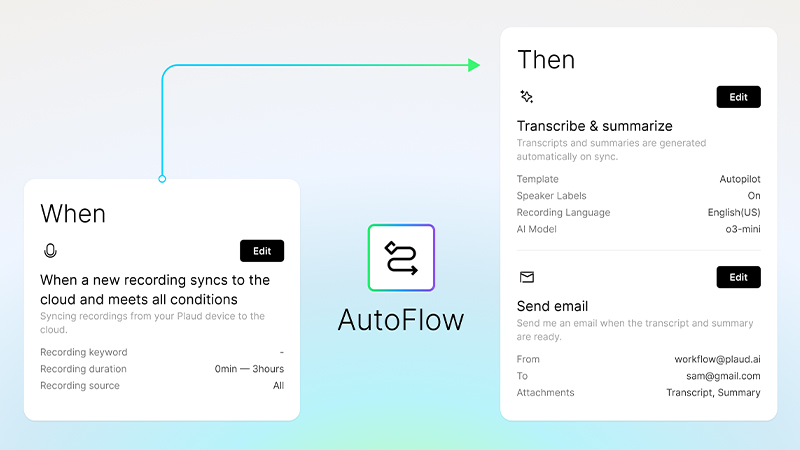
The good thing is that you do not have to process every recording in the same way. You can create different AutoFlows depending on what you usually record and what kind of summary you want back.
Different meetings need different notes
Imagine that you work with both client meetings, internal projects, and interviews. Even if everything consists of recorded conversations, you may not want the same type of documentation afterward.
After a client meeting, you may mainly want to see which needs came up and which questions need follow-up. An internal project meeting may instead need a clear overview of decisions, responsibilities, and next steps. And an interview may be more useful as a full transcript, where you can easily find your way back to different points in the discussion.
With AutoFlow, you can set different rules for how incoming recordings should be processed. That makes the documentation better suited to the work itself, instead of every recording getting only a general summary.
You should, however, always check important decisions and details against the original material. AI can be excellent support, but it should not have to guess who actually promised to do what.
Let the summary come to you
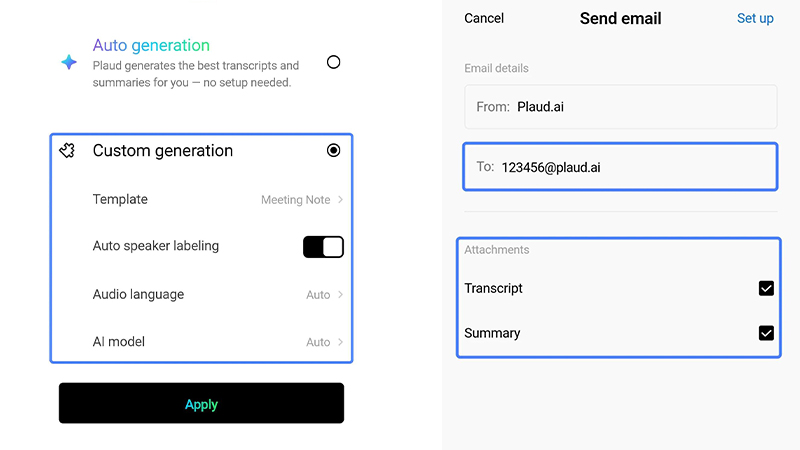
Another practical option is to let Plaud send the result by email when processing is complete. That can be useful on days when you use several different programs and do not want to open yet another app to see whether your notes are ready.
For example, you can finish a meeting, move on to your next task, and later receive confirmation that the transcript and summary are available. That way, the post-processing itself does not demand attention right when the conversation ends.
AutoFlow is not intended to automatically process absolutely every short recording. Among other things, the feature has a minimum requirement of more than 200 words in the recording, which is roughly equivalent to five minutes of speech. Shorter voice notes can still be uploaded, but they will not start an AutoFlow according to the documented feature.
Get started with your first AutoFlow
To begin, open the Plaud app and find AutoFlow among the features in Explore. There, you can create a new workflow and choose which conditions should determine when it is used.
A good first step is to start with the type of recording you make most often. If you have lots of meetings, you can begin with a workflow for meeting summaries. Then choose how the material should be processed and whether you want to receive an email when the result is ready.
Once you have tested it a few times, you can create more AutoFlows for other situations. It is worth knowing, however, that the order of the rules matters. If several workflows match the same recording, the first one that meets the conditions is used.
How the settings are shown can also vary between versions of the Plaud app and the web platform. In newer versions, the term Routines is also used for the equivalent automated workflows.
More time for the conversation, less for the follow-up
One of the biggest advantages of Plaud is that you can focus on the conversation instead of trying to write down everything that is said. AutoFlow builds on the same idea, but also takes care of some of the work that comes afterward.
That does not mean every meeting will automatically be perfectly documented. A summary still needs to be reviewed, and it is important that recordings are handled according to the rules that apply to the conversation and the workplace.
But once you have found a workflow that fits your everyday routine, the difference can become quite clear. The recording ends, Plaud handles the processing, and you can move on to the next task.
Sometimes the smartest AI feature is simply the one you do not have to think about every time you use it.
FAQ
What is Plaud AutoFlow?
AutoFlow is a feature that automates the transcription and summarization of recordings. You create rules for which recordings should be processed and how the result should be presented. When the conditions are met, the process can start automatically after the recording has been synced or uploaded.
Can I create different AutoFlows for different types of meetings?
Yes, you can create multiple automated workflows for different use cases. For example, you might want one type of summary for client meetings and another for lectures. The order of the rules matters, because the first workflow that matches a recording is used.
Does AutoFlow also work for short voice notes?
AutoFlow has a minimum requirement of more than 200 words in a recording, which is roughly equivalent to five minutes of speech. Shorter recordings can still be transferred to Plaud, but they will not start the automatic processing via AutoFlow. They can instead be handled manually.
Can I get my meeting summaries by email?
Yes, AutoFlow supports sending the results by email when processing is complete. It is useful if you want the information without constantly checking the Plaud app. The available options may vary depending on which app or web version you are using.
What is the difference between AutoFlow and Routines?
AutoFlow is the name used in earlier versions of Plaud's automated workflows. In the newer web platform, the term Routines is used. Both are part of automating the processing of recordings, but the interface and settings may differ between versions.